> ## Documentation Index
> Fetch the complete documentation index at: https://docs.cowagent.ai/llms.txt
> Use this file to discover all available pages before exploring further.
# scheduler - Scheduler
> Create and manage scheduled tasks
Create and manage dynamic scheduled tasks with flexible scheduling and execution modes.
## Dependencies
| Dependency | Install Command |
| ------------------ | ----------------------------- |
| `croniter` ≥ 2.0.0 | `pip install croniter>=2.0.0` |
Included in core dependencies: `pip3 install -r requirements.txt`
## Scheduling Modes
| Mode | Description |
| --------------- | ------------------------------------------ |
| One-time | Execute once at a specified time |
| Fixed interval | Repeat at fixed time intervals |
| Cron expression | Define complex schedules using Cron syntax |
## Execution Modes
* **Fixed message**: Send a preset message when triggered
* **Agent dynamic task**: Agent intelligently executes the task when triggered
## Usage
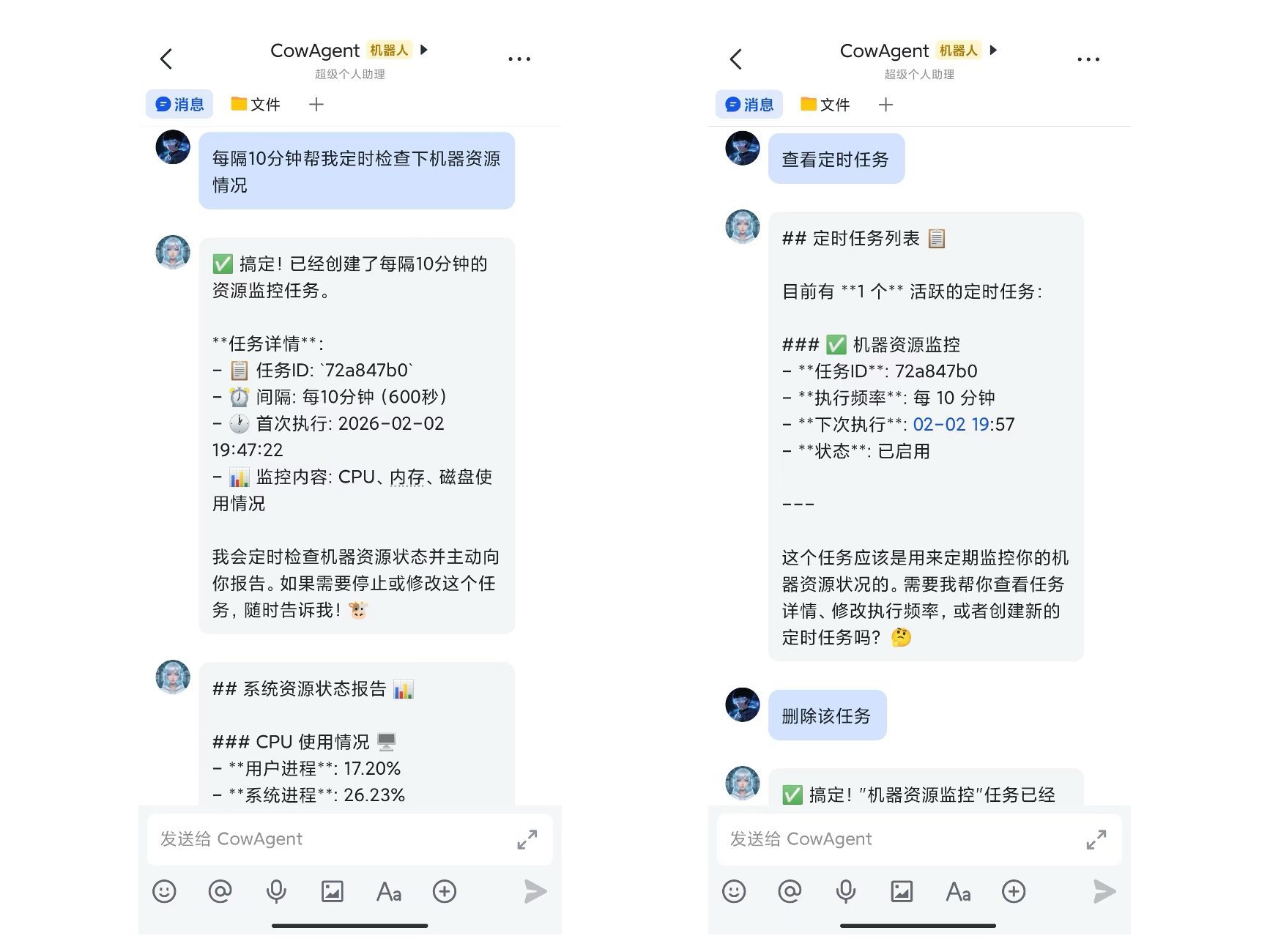
Create and manage scheduled tasks with natural language:
* "Send me a weather report every morning at 9 AM"
* "Check server status every 2 hours"
* "Remind me about the meeting tomorrow at 3 PM"
* "Show all scheduled tasks"
 ## Results injected into the conversation
Scheduled tasks run inside an isolated session (so internal planning and tool calls do not pollute the user's chat), but the **final output** is written back to the user's real session as a message pair. You can directly follow up — e.g. "expand on point 2 from earlier".
**Default policy**
* Output of Agent dynamic tasks is injected into the conversation
* Fixed-message tasks are not injected by default (configurable)
* Each session keeps the most recent **3 pairs** of scheduler messages; older pairs are pruned automatically. Regular user messages are unaffected
**Configuration**
| Key | Default | Description |
| ---------------------------------- | ------- | -------------------------------------------- |
| `scheduler_inject_to_session` | `true` | Master switch |
| `scheduler_inject_max_per_session` | `3` | Max scheduler message pairs kept per session |
| `scheduler_inject_send_message` | `false` | Whether to also inject fixed-message tasks |
```json theme={null}
{
"scheduler_inject_to_session": true,
"scheduler_inject_max_per_session": 3,
"scheduler_inject_send_message": false
}
```
## Context inside scheduled task execution
The isolated session for scheduled tasks retains a few recent runs of conversation history, so you can naturally do "compare with last time" or "continue from previous conclusion". To prevent prompts from growing unbounded for high-frequency tasks (e.g. a 5-minute monitor), history is auto-trimmed:
```
scheduler_keep_turns = max(1, agent_max_context_turns / 5)
```
`agent_max_context_turns` defaults to `20`, so each scheduled run keeps the most recent **4 turns** of history by default. Increase `agent_max_context_turns` if you need longer memory.
For group-chat scenarios (Feishu / WeCom group bots / DingTalk, etc.), the user's real `session_id` looks like `user_id:group_id` — different from `receiver`. Scheduler records the correct `session_id` when a task is created. For older `tasks.json` entries missing this field, the runtime falls back to `receiver`, matching legacy behavior.
## Results injected into the conversation
Scheduled tasks run inside an isolated session (so internal planning and tool calls do not pollute the user's chat), but the **final output** is written back to the user's real session as a message pair. You can directly follow up — e.g. "expand on point 2 from earlier".
**Default policy**
* Output of Agent dynamic tasks is injected into the conversation
* Fixed-message tasks are not injected by default (configurable)
* Each session keeps the most recent **3 pairs** of scheduler messages; older pairs are pruned automatically. Regular user messages are unaffected
**Configuration**
| Key | Default | Description |
| ---------------------------------- | ------- | -------------------------------------------- |
| `scheduler_inject_to_session` | `true` | Master switch |
| `scheduler_inject_max_per_session` | `3` | Max scheduler message pairs kept per session |
| `scheduler_inject_send_message` | `false` | Whether to also inject fixed-message tasks |
```json theme={null}
{
"scheduler_inject_to_session": true,
"scheduler_inject_max_per_session": 3,
"scheduler_inject_send_message": false
}
```
## Context inside scheduled task execution
The isolated session for scheduled tasks retains a few recent runs of conversation history, so you can naturally do "compare with last time" or "continue from previous conclusion". To prevent prompts from growing unbounded for high-frequency tasks (e.g. a 5-minute monitor), history is auto-trimmed:
```
scheduler_keep_turns = max(1, agent_max_context_turns / 5)
```
`agent_max_context_turns` defaults to `20`, so each scheduled run keeps the most recent **4 turns** of history by default. Increase `agent_max_context_turns` if you need longer memory.
For group-chat scenarios (Feishu / WeCom group bots / DingTalk, etc.), the user's real `session_id` looks like `user_id:group_id` — different from `receiver`. Scheduler records the correct `session_id` when a task is created. For older `tasks.json` entries missing this field, the runtime falls back to `receiver`, matching legacy behavior.