> ## Documentation Index
> Fetch the complete documentation index at: https://docs.cowagent.ai/llms.txt
> Use this file to discover all available pages before exploring further.
# WeChat Official Account
> Integrate CowAgent with WeChat Official Accounts
CowAgent supports both personal subscription accounts and enterprise service accounts.
| Type | Requirements | Features |
| ------------------------- | --------------------------------------------- | ---------------------------------------------------------------------------------------- |
| **Personal Subscription** | Available to individuals | Sends a placeholder reply first; users must send a message to retrieve the full response |
| **Enterprise Service** | Enterprise with verified customer service API | Can proactively push replies to users |
Official Accounts only support server and Docker deployment, not local run mode. Install extended dependencies: `pip3 install -r requirements-optional.txt`
## 1. Personal Subscription Account
Add the following configuration to `config.json`:
```json theme={null}
{
"channel_type": "wechatmp",
"single_chat_prefix": [""],
"wechatmp_app_id": "wx73f9******d1e48",
"wechatmp_app_secret": "YOUR_APP_SECRET",
"wechatmp_aes_key": "",
"wechatmp_token": "YOUR_TOKEN",
"wechatmp_port": 80
}
```
### Setup Steps
These configurations must be consistent with the [WeChat Official Account Platform](https://mp.weixin.qq.com/advanced/advanced?action=dev\&t=advanced/dev). Navigate to **Settings & Development → Basic Configuration → Server Configuration** and configure as shown below:
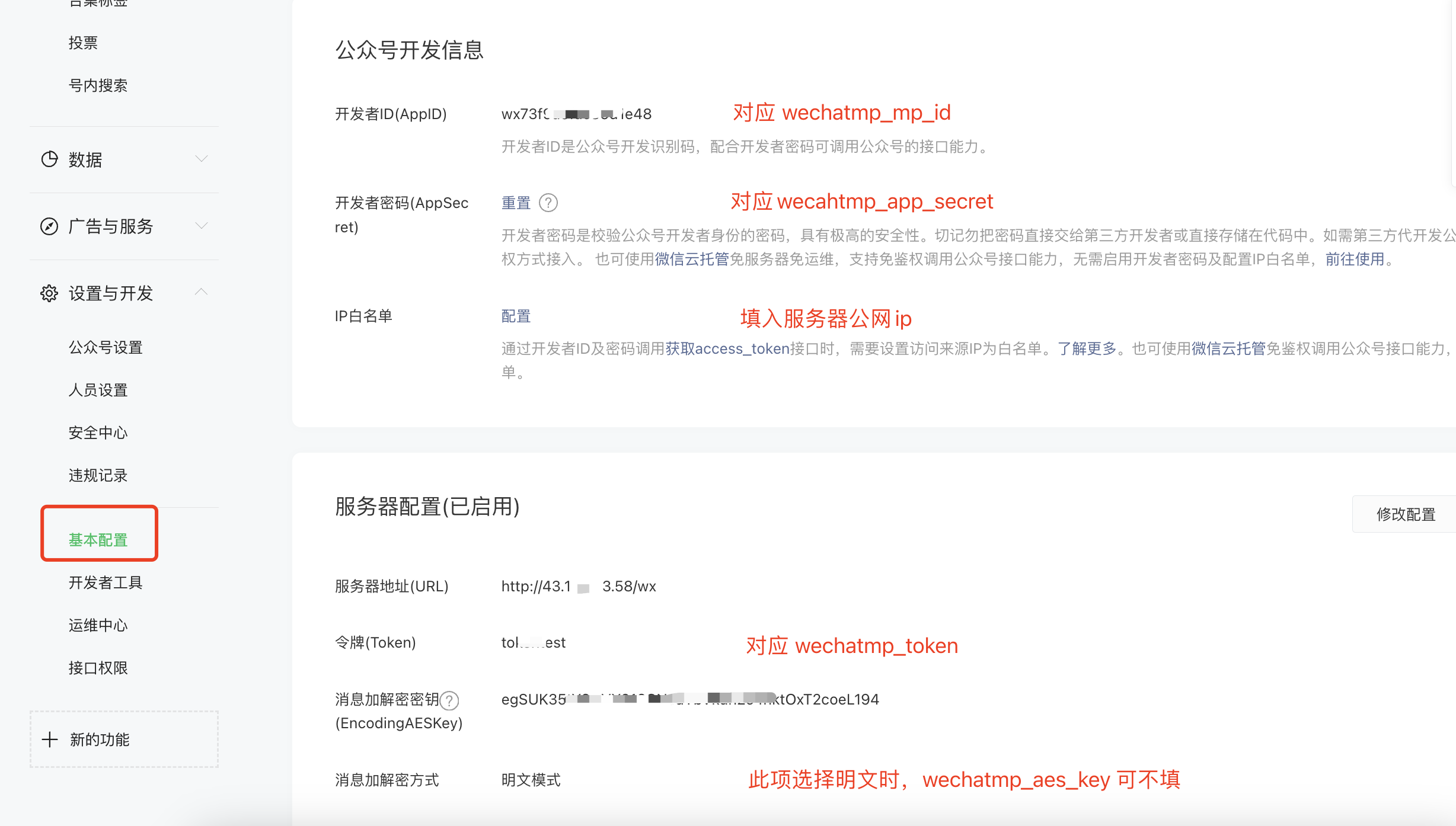 1. Enable the developer secret on the platform (corresponds to `wechatmp_app_secret`), and add the server IP to the whitelist
2. Fill in the `config.json` with the official account parameters matching the platform configuration
3. Start the program, which listens on port 80 (use `sudo` if you don't have permission; stop any process occupying port 80)
4. **Enable server configuration** on the official account platform and submit. A successful save means the configuration is complete. Note that the **"Server URL"** must be in the format `http://{HOST}/wx`, where `{HOST}` can be the server IP or domain
After following the account and sending a message, you should see the following result:
1. Enable the developer secret on the platform (corresponds to `wechatmp_app_secret`), and add the server IP to the whitelist
2. Fill in the `config.json` with the official account parameters matching the platform configuration
3. Start the program, which listens on port 80 (use `sudo` if you don't have permission; stop any process occupying port 80)
4. **Enable server configuration** on the official account platform and submit. A successful save means the configuration is complete. Note that the **"Server URL"** must be in the format `http://{HOST}/wx`, where `{HOST}` can be the server IP or domain
After following the account and sending a message, you should see the following result:
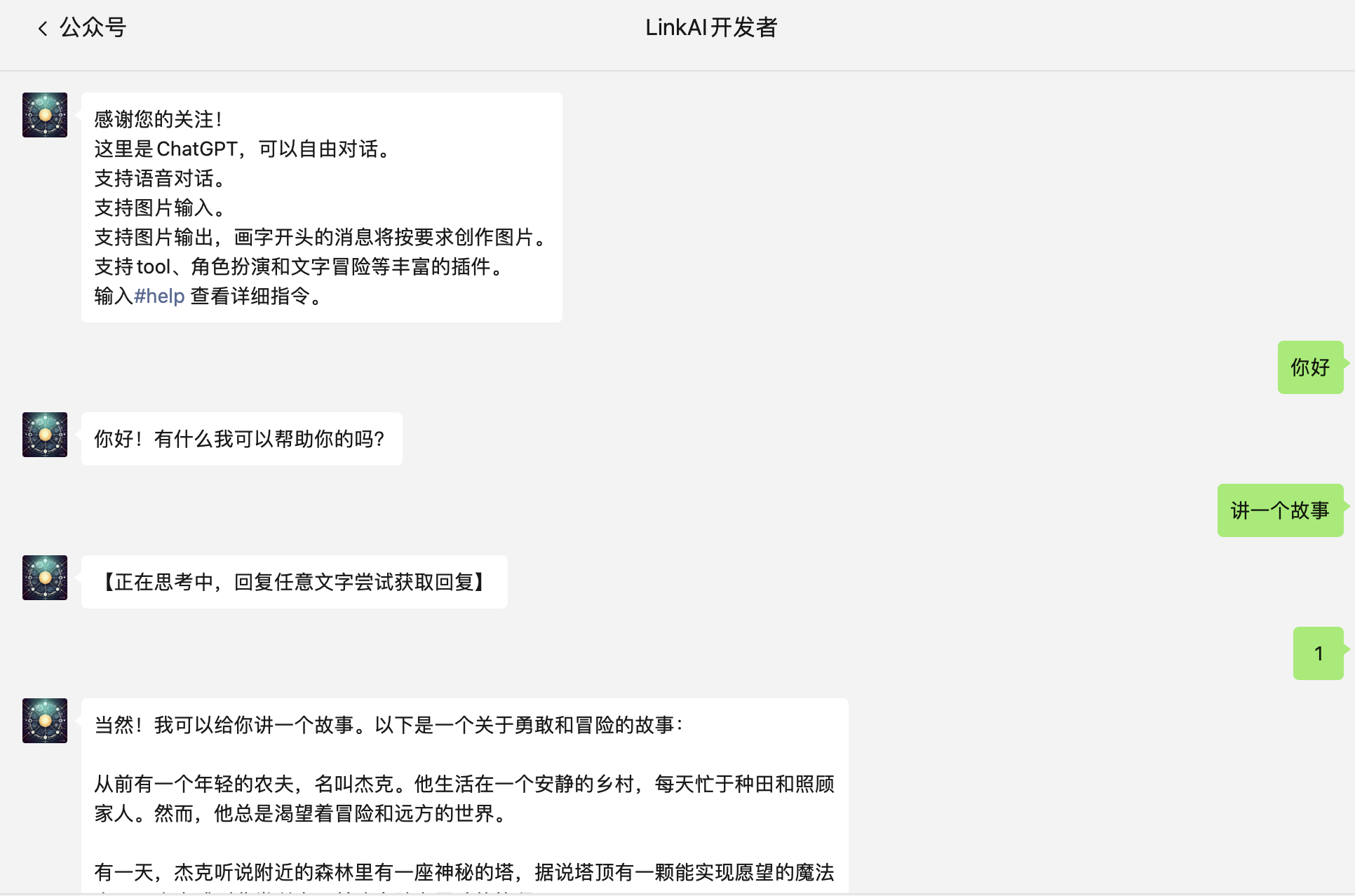 Due to subscription account limitations, short replies (within 15s) can be returned immediately, but longer replies will first send a "Thinking..." placeholder, requiring users to send any text to retrieve the answer. Enterprise service accounts can solve this with the customer service API.
**Voice Recognition**: You can use WeChat's built-in voice recognition. Enable "Receive Voice Recognition Results" under "Settings & Development → API Permissions" on the official account management page.
## 2. Enterprise Service Account
The setup process for enterprise service accounts is essentially the same as personal subscription accounts, with the following differences:
1. Register an enterprise service account on the platform and complete WeChat certification. Confirm that the **Customer Service API** permission has been granted
2. Set `"channel_type": "wechatmp_service"` in `config.json`; other configurations remain the same
3. Even for longer replies, they can be proactively pushed to users without requiring manual retrieval
```json theme={null}
{
"channel_type": "wechatmp_service",
"single_chat_prefix": [""],
"wechatmp_app_id": "YOUR_APP_ID",
"wechatmp_app_secret": "YOUR_APP_SECRET",
"wechatmp_aes_key": "",
"wechatmp_token": "YOUR_TOKEN",
"wechatmp_port": 80
}
```
Due to subscription account limitations, short replies (within 15s) can be returned immediately, but longer replies will first send a "Thinking..." placeholder, requiring users to send any text to retrieve the answer. Enterprise service accounts can solve this with the customer service API.
**Voice Recognition**: You can use WeChat's built-in voice recognition. Enable "Receive Voice Recognition Results" under "Settings & Development → API Permissions" on the official account management page.
## 2. Enterprise Service Account
The setup process for enterprise service accounts is essentially the same as personal subscription accounts, with the following differences:
1. Register an enterprise service account on the platform and complete WeChat certification. Confirm that the **Customer Service API** permission has been granted
2. Set `"channel_type": "wechatmp_service"` in `config.json`; other configurations remain the same
3. Even for longer replies, they can be proactively pushed to users without requiring manual retrieval
```json theme={null}
{
"channel_type": "wechatmp_service",
"single_chat_prefix": [""],
"wechatmp_app_id": "YOUR_APP_ID",
"wechatmp_app_secret": "YOUR_APP_SECRET",
"wechatmp_aes_key": "",
"wechatmp_token": "YOUR_TOKEN",
"wechatmp_port": 80
}
```